

Client Service Design Case Study
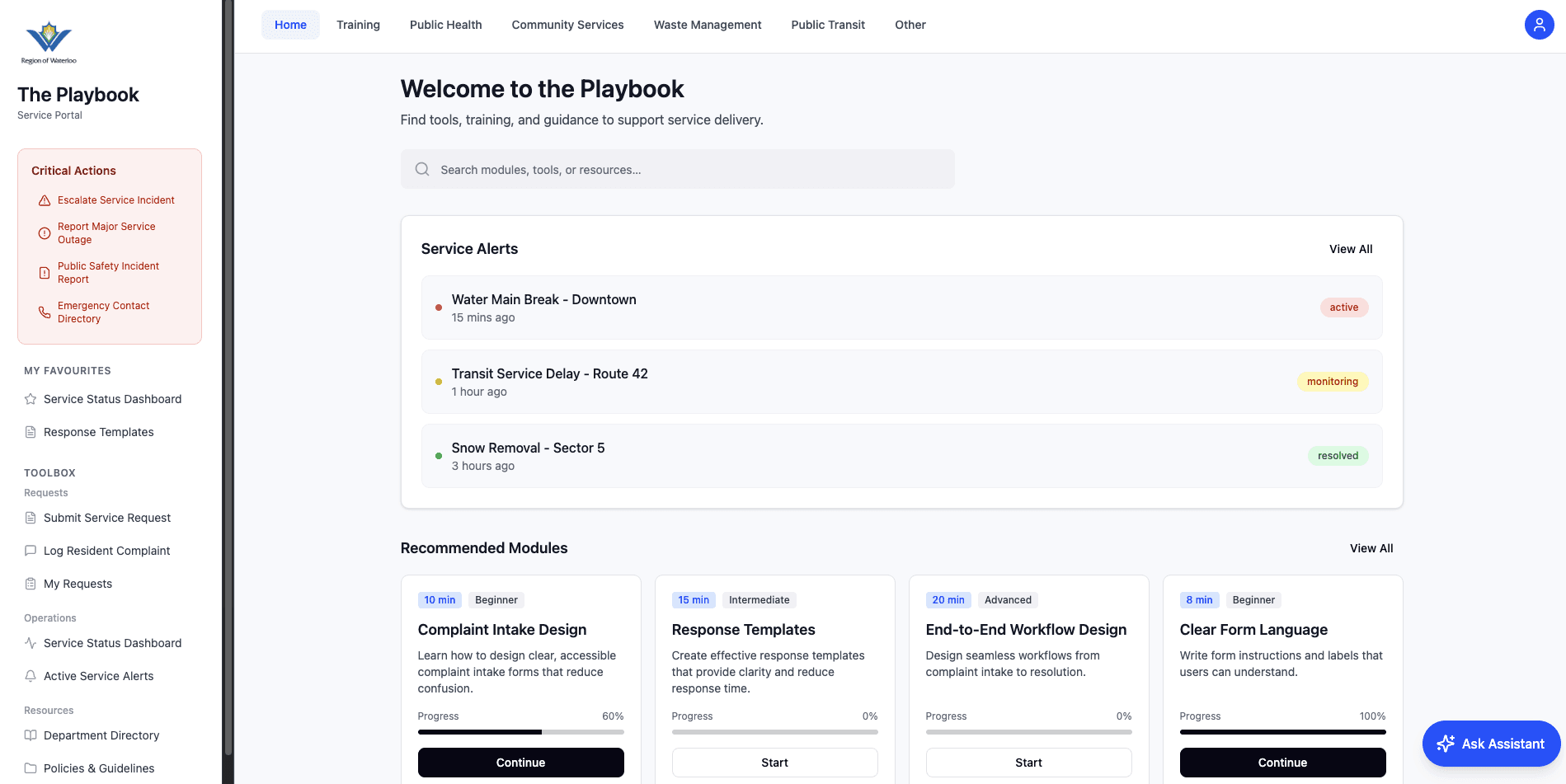
ROLE
UX / Product Designer
TIMELINE
Winter 2026
TEAM
7-person UX team
The Region asked us to explore how staff could deliver more consistent digital services across departments. We created one shared Playbook with clear guidance, reusable standards and quick access to everyday tools.
01 — Overview
Region staff needed one shared place for designing pages, forms and service workflows. We turned service-design standards into clear, practical guidance they could use every day.
02 — Problem
Problem 01
Without shared standards, teams could design digital services in different ways.
Problem 02
Staff did not have one clear place for standards, tools and examples.
Opportunity: Create a centralized Digital Service Playbook for Region of Waterloo staff.
03 — Discovery
The issue was bigger than one complaint page. Residents struggled to find information, understand labels and complete forms. Staff needed shared standards to make services more consistent.
Staff Interviews
Observed Staff at Work
Website Review
Compared Similar Services
Journey and Empathy Maps
People arrive with a task
Residents generally weren’t browsing. They came to accomplish something specific and wanted the answer quickly.
Search often beats navigation
When website labels did not match the words people used, they often turned to search.
Forms create hesitation
Unclear fields and uncertainty around what happens after submission caused users to pause.
Inconsistency creates staff work
Different templates, terms and workflows made staff spend more time understanding requests and rebuilding the same solutions.
04 — Direction
My Contribution
I led the idea generation and helped choose which Playbook concepts and learning resources we would build.
Rather than make another long handbook, we designed an interactive Playbook. Staff could quickly find guidance, practise common tasks and use shared standards while working.
Better Together Waterloo Services
WHY COMPLAINTS?
We used the complaint process because it includes forms, responses, page structure and staff workflows. It gave us a realistic way to test whether the Playbook could guide someone through a complex task.
The opportunity wasn’t just to document best practices. It was to make them easier to learn, find and apply.
05 — Testing
We tested the prototype with three Region employees who had different levels of experience. Our team ran the sessions together.
USER VALIDATION
Different users expected different paths.
KEY INSIGHT
The Playbook needed to support both browsing and search because not everyone looked for information in the same way.
Where Users Got Stuck
01
Similar actions sounded too similar
Users could confuse “Log Complaint” with “Submit Service Request.”
Design Change
Rename the second action to “Submit a New Service Request.”
02
Experienced staff followed familiar paths
One experienced user expected complaint tools under Operations, not Toolbox.
Design Change
Add a tooltip, clearer guidance and a link from Operations to the complaint workflow.
03
New employees leaned on search
The Toolbox label wasn’t immediately meaningful to every new employee.
Design Change
Keep search easy to see, suggest “complaint” results and explain what users can find in Toolbox.
DESIGN RATIONALE
Testing showed that staff looked for information in different ways. Instead of forcing everyone to follow one path, we added an AI assistant to help people find tools and answer questions when they got stuck.
Support multiple ways of finding the same answer.
06 — Solution
The final Playbook combines clear navigation, searchable guidance, practical tools and AI assistance in one structured workspace.
AI PLAYBOOK ASSISTANT — CHATBOT SCREEN
AI Playbook Assistant
A chat-based helper that helps staff find the right tool and understand Playbook guidance when the path isn’t clear.
STAFF MEMBER
Where do I log a resident complaint?
AI ASSISTANT
You can find Log Resident Complaint under Toolbox, or open it directly from Quick Actions.
The assistant supports navigation and search. It helps staff find and understand information, but it does not complete service tasks for them.
THREE WAYS TO FIND INFORMATION
Browse → Search → Ask
Browse
Use the sidebar and service categories.
Search
Find tools and resources directly.
Ask
Use the AI Playbook Assistant when the correct path isn’t obvious.
Clear navigation first. Search when needed. AI assistance when users still need help.
07 — Outcome
The Playbook is meant to help staff make clearer design decisions earlier. These are intended benefits, not measured results.
Fewer Errors
Train staff before problems happen.
Faster Onboarding
Give new employees structured guidance and examples.
More Consistency
Align teams around the same service standards.
Less Rework
Help staff make stronger design decisions earlier.
My Biggest Takeaway
Internal tools are still designed for people. Clearer guidance for staff can lead to better services for residents.